
Filtered Component Selection
Overview
Filtered Select builds a component selection set using common filtering options (selection scope, component type, nesting, distinct selection, and optional name filtering). It is intended as a utility command and also as the shared component-selection model used by many other tools in this add-in.
How It Works
Filtered Select scans components using the current selection mode and filtering inputs, then replaces the active document selection set with the resulting component occurrences. This lets you run downstream operations (such as parameter updates, rule operations, or utilities) on an accurate filtered subset of the assembly.
When Selection Scope is All, the tool gathers components from the active assembly and then applies the type, nesting, distinct, and name filters. When Selection Scope is Selection Set, it filters the existing selection set rather than scanning the entire assembly.
Usage Instructions
- Open an assembly document.
- Start Filtered Select.
- Choose the selection scope: All or Selection Set.
- Choose component type and nesting options, and optionally enable Distinct.
- Optional: enable the name filter and enter a wildcard pattern.
- Click Apply to build the selection set.
Troubleshooting
- Apply is disabled: If Selection Set mode is selected, ensure the selection set contains items.
- No components selected: Adjust type, nesting, distinct, or name filter settings.
- Unexpected results: Verify whether the selection scope is All vs Selection Set (Selection Set filters only what is already selected).
Examples
Example: Select all parts
Set scope to All, component type to Part, and click Apply.
Example: Select only top-level assemblies
Set scope to All, component type to Assembly, nesting to None, and click Apply.
Example: Filter the current selection set by name
Select components in Inventor, set scope to Selection Set, enable name filter (e.g. *Bracket*), and click Apply.
Dialog Box Input
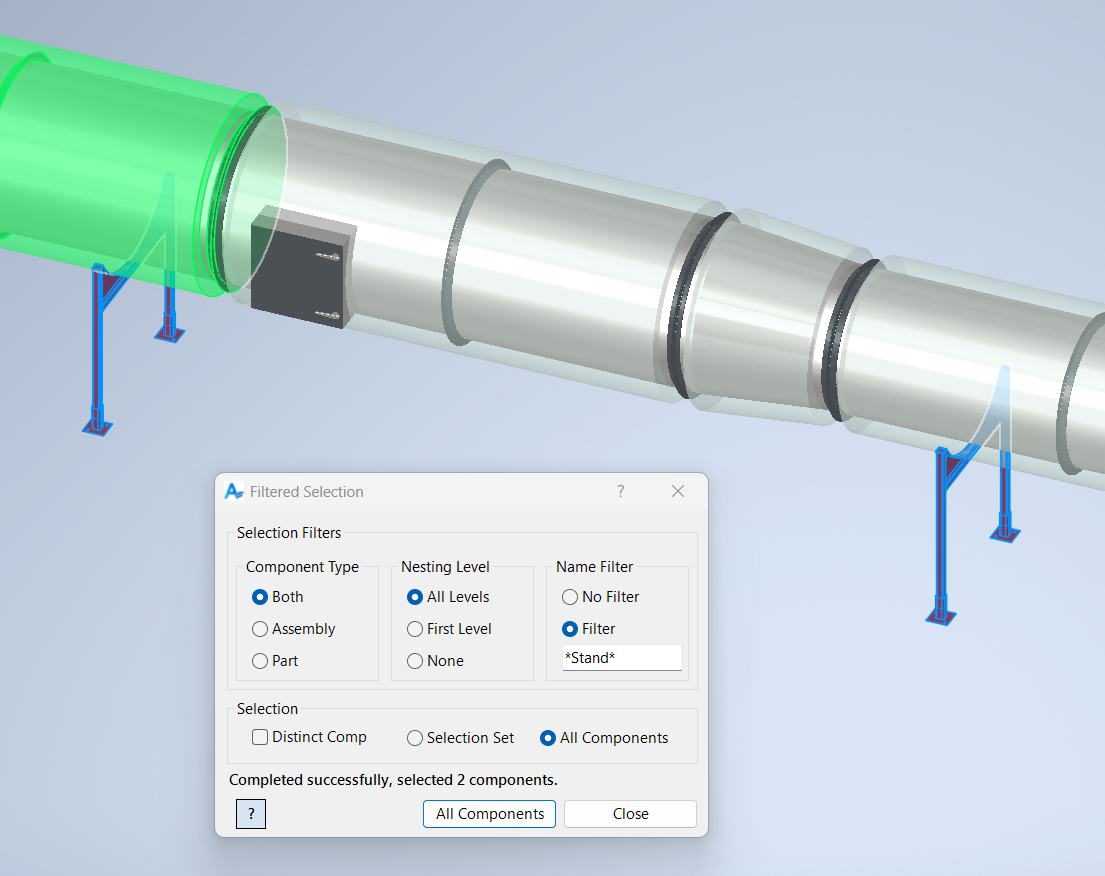
Selection Scope
All: Select all components in the assembly, filtered by type, nesting, distinct, and name.
Selection Set: Filter the current selection set.
Distinct: Select only the first occurrence of a set of duplicate components (when applicable).
Component Type
Both: Include both assembly and part components.
Assembly: Include only assemblies.
Part: Include only parts.
Nesting Level
All Levels: Include nested components.
First Level: Include first-level components only.
None: Include only top-level components.
Name Filter
No Filter: Include all components that match other filters.
Filter: Include only components whose name matches the wildcard filter pattern.
Samples
See Sample Filtered Select for an example, and Samples Summary for where sample files are installed.
